The perceptron is the simplest neural network: weigh the inputs, add them up, and output yes or no. Train it by moving the weights a little in the direction that reduces the error. Stack layers of them and a network can learn curved boundaries, recognise your drawings, or paint an image from coordinates.
Gradient descent — rolling downhill on the error surface — is how it learns, and overfitting is what happens when it memorises instead of understanding.
Every simulation below runs right here in your browser, for free, with live controls. Open one, change the sliders, and use the mouse — most of them respond to it.
Neural Networks simulations
The Perceptron
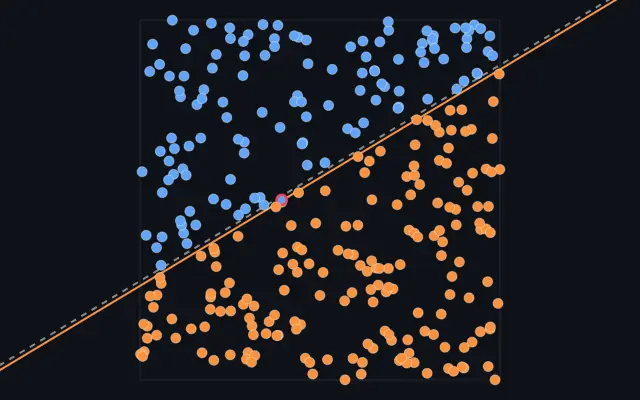
The perceptron (Rosenblatt, 1958) is the simplest neural network: one neuron. It multiplies each input by a weight, adds them up together with a bias, and outputs the sign of the sum.
Training is supervised learning. For each point, error = target − guess, then weight += error × input × learning rate. Mistakes nudge the weights, and the orange learned line rotates until it matches the hidden dashed line.
Try this: Click "New line" while it's training. Click the canvas to add points.
Neural Network Playground
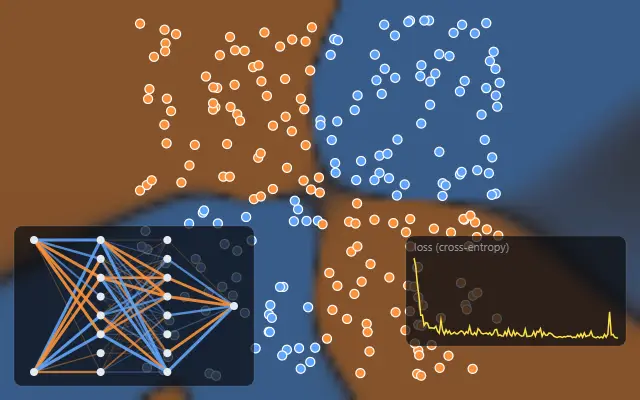
A multilayer perceptron stacks layers of neurons with nonlinear activation functions (tanh here). With hidden layers it can learn curved decision boundaries, including XOR, which no single perceptron can solve.
Training uses backpropagation: compute the output error, send it backward through the network using the chain rule, and nudge every weight downhill (gradient descent). The background shows the network's prediction everywhere on the plane.
Try this: Try "Two spirals" with 1 hidden layer, then with 3. Left-click adds blue points, right-click adds orange.
Open Neural Network Playground →
Neural Network Curve Fitting
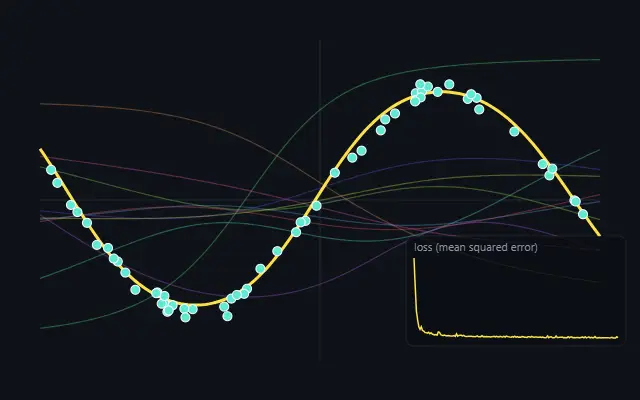
The perceptron could only draw a straight line. A network with hidden layers can approximate any smooth function (the universal approximation theorem). Here it learns y = f(x) from example points by minimising the mean squared error.
The faint coloured curves are the outputs of the last hidden layer's neurons. Each is a bent and shifted tanh, and the final yellow curve is just a weighted sum of them. Watch the network build a complex shape out of simple pieces.
Try this: Choose "Bumps" with 2 neurons, then 4, then 16. Left-click adds points, right-click removes them.
Open Neural Network Curve Fitting →
Gradient Descent Optimizers
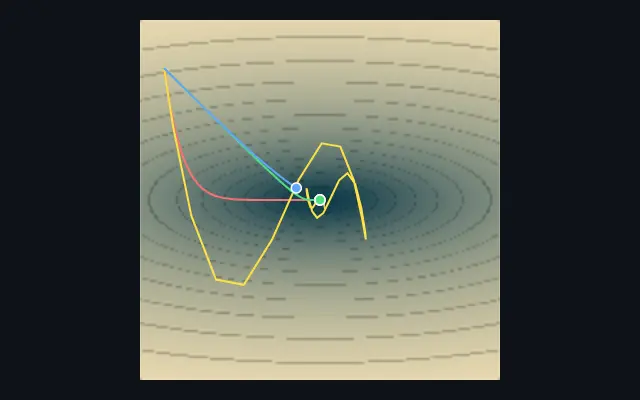
Training a neural network means rolling downhill on a loss landscape. This 2D landscape stands in for the millions of dimensions of a real network. Four optimizers race from the same starting point:
Try this: Try "Rosenbrock valley" and see which ones make it down the curved valley. Click to choose a new start point.
Open Gradient Descent Optimizers →
Teach a Network Your Drawings
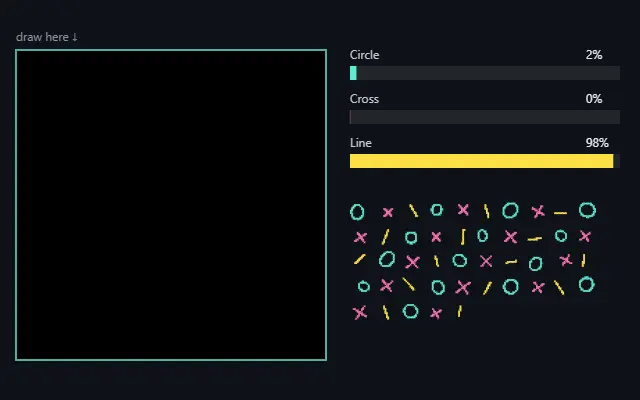
The perceptron sorted 2D points. A real image classifier works the same way, just with more inputs. Your drawing is shrunk to 16×16 pixels, giving 256 brightness values, and fed into a network with one hidden layer and three outputs, one per class.
Draw a shape on the pad and add it as an example of class A, B or C. The network trains continuously on all examples. Its live guesses for whatever is on the pad are shown as bars. Starter examples (circles, crosses, lines) are generated so it works straight away.
Try this: Draw a circle and check the prediction. Then teach it a new shape, like a triangle as class C, with five or six examples.
Open Teach a Network Your Drawings →
Overfitting & Regularization
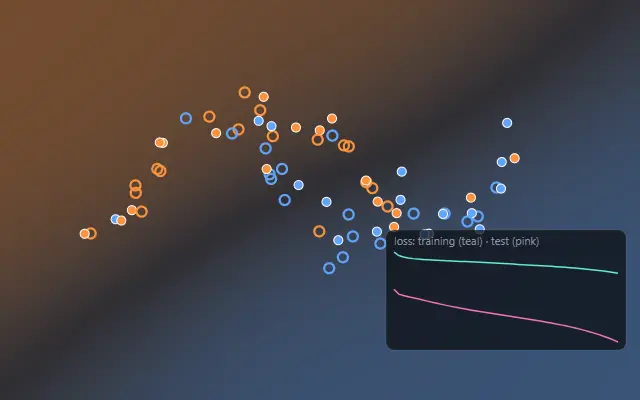
A big enough network can memorise anything, including the noise. Here the data is split in two: the network trains only on the training points (filled) and is checked on unseen test points (hollow). As training goes on, training loss keeps falling, but test loss eventually turns back up. The decision boundary has started wrapping around individual noisy points.
L2 regularization (weight decay) shrinks every weight a little each step, preferring simpler, smoother functions. With the right amount, both losses stay low together.
Try this: Run with λ = 0 until the test loss (pink) rises, then press "Restart" with λ around 0.002.
Open Overfitting & Regularization →
Neural Network Painter
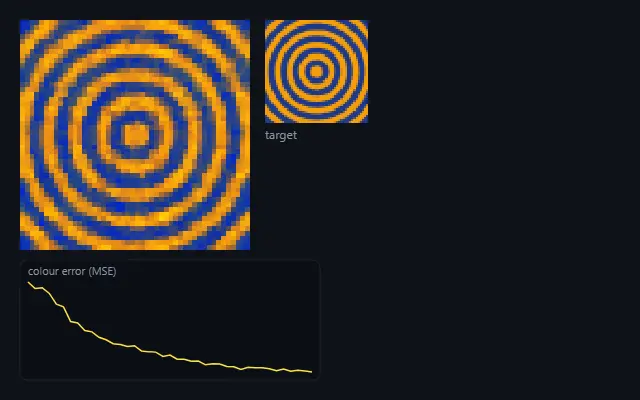
Curve fitting in 2D with colour. The network learns a function from a pixel's position (x, y) to its colour (r, g, b). Once trained, the whole picture is stored in its weights: a coordinate network, the idea behind NeRF 3D scenes.
Plain networks have a spectral bias: they learn blurry, low-frequency shapes first and struggle with sharp detail. Feeding in Fourier features (sines and cosines of the coordinates at several frequencies) lets them capture sharp edges much faster.
Try this: Train the "Rings" target with Fourier features off, then on, and compare the sharpness after the same number of steps.
K-Means Clustering
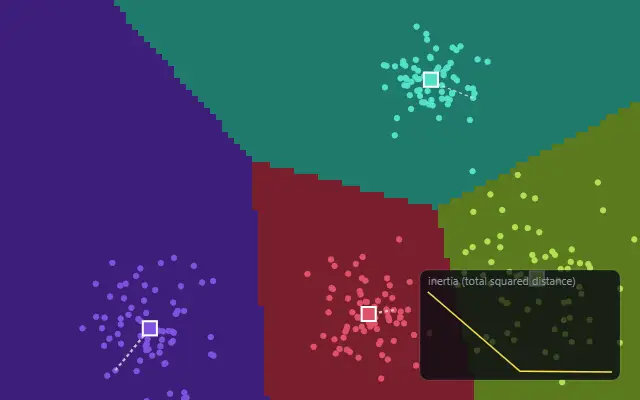
Not all learning needs labels. K-means finds groups by itself by repeating two steps. (1) Assign: each point joins its nearest centroid. (2) Update: each centroid moves to the mean of its points. Each round can only lower the total squared distance (the inertia), so it is a kind of descent, and it always converges, though not always to the best answer.
The background shows the Voronoi regions: which centroid owns each part of the plane. Bad starting positions can leave a centroid stranded, which is why k-means++ spreads the initial centroids out.
Try this: Set K higher than the real number of blobs and watch one blob get split. Click to add points.
Evolve them into something new
Several of these are already evolutions: Neural Network Curve Fitting grew out of The Perceptron; Gradient Descent Optimizers grew out of Neural Network Playground; Teach a Network Your Drawings grew out of The Perceptron; Overfitting & Regularization grew out of Neural Network Playground. In Labs you can take any of them a generation further: press Evolve this, get suggestions for what the next version could add, and build the one you like — or combine two or three simulations into one system.
Make your own simulation →
Pick neural networks as a concept, choose an art piece, game, explainer or experiment, and Labs suggests ideas and builds the one you choose.